
Digital solutions
Microsoft Dynamics 365 Business Central – the ERP platform for growing companies
Cloudmaven implements Business Central for small and mid-sized companies, with a focus on finance, sales, purchasing and warehousing, natively integrated into Microsoft 365.

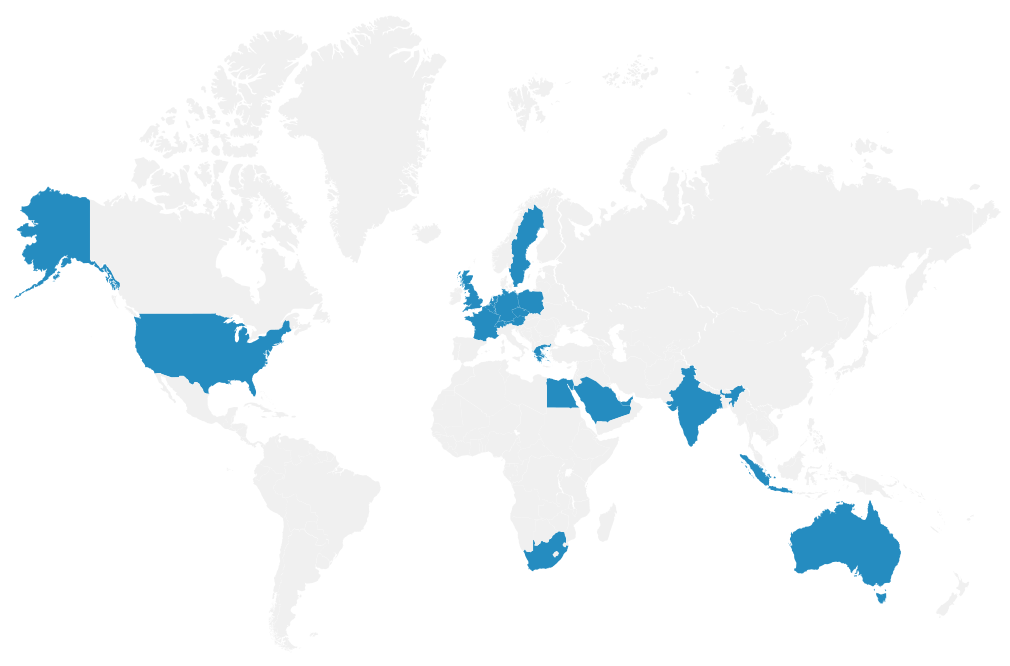
Cloudmaven in Figures
16+
Locations worldwide (Europe, EMEA, America, Asia)
30+
Countries in which we operate
120+
ERP and EPM employees
350+
satisfied customers
400+
Successfully implemented projects
Companies that already rely on our portfolio
Business Central – thought through from a finance perspective
Fast go-live Pre-configured standard processes typically make go-live noticeably faster than classic ERP projects.
Modular licensing Essentials, Premium and Team Member licenses can be tailored exactly to actual usage.
Native Microsoft ecosystem Teams, Outlook, Excel, Power BI and Power Automate, no third-party connector required.
AI-powered Microsoft Copilot assists with bank reconciliation, sales text and natural-language data analysis, among other tasks.
Transparent financial control General ledger, accounts payable/receivable, fixed assets, consolidation and real-time cash flow.
Local compliance German chart of accounts (SKR03/SKR04), OSS reporting, e-invoicing and GoBD-compliant processes.
Usable internationally Multi-currency capability, multiple languages and inter-company logic for subsidiaries.
Scalable Grows from a single entity to a multi-entity group.
Predictable cost Monthly cloud subscription instead of a large upfront investment in licenses and infrastructure.
Features
From growing company to multi-entity group. Business Central is a reliable foundation for better decisions, leaner operations and sustainable cost efficiency. As a cloud ERP, it grows with your company, new modules, locations or subsidiaries can be added without building additional infrastructure.
The four core areas of Business Central
Finance General ledger, accounts payable and receivable, fixed assets, multi-currency logic, consolidation of subsidiaries, cash flow management.
Sales and Purchasing Quote, order, shipment, invoice and credit memo on the sales side, request, purchase order, goods receipt and vendor bill on the purchasing side, including pricing and discount logic.
Warehouse and Supply Chain Inventory management, multi-location logic, lot and serial number tracking, demand planning and vendor management.
Projects and Service Project management with resource and budget planning, plus, in the Premium license, service and maintenance management including light manufacturing.










License guidance: Essentials vs. Premium
A short comparison block that works well for competitors to help prospects orient themselves, creates pricing transparency without quoting exact figures that change frequently:
License
Team Member
Covers
Read access, approvals, basic time/expense entry
Typical use
Management, warehouse staff, departments without daily bookkeeping work
License
Essentials
Covers
Finance, sales, purchasing, warehouse, project management
Typical use
Companies with production or an active service/maintenance business
License
Premium
Covers
Everything in Essentials plus service and manufacturing management
Typical use
Core users in accounting, sales and purchasing, covers most users

We connect your relevant systems seamlessly
Cloudmaven connects Business Central seamlessly to your existing system landscape: Microsoft 365 and Power Platform, DATEV, payment providers and banks, CRM systems such as HubSpot or Dynamics 365 Sales, as well as EDI and webshop connections.

Switching from an existing system
Many visitors arrive on this page with a migration question in mind, a dedicated section with rough guidance increases relevance for searches like “Navision to Business Central” or “replacing Sage”. Timeframes deliberately given as ranges, not verified facts:
Source system
Dynamics NAV / Navision
Typical migration effort
low to medium
What matters most
Similar data model, custom modifications need to be assessed and migrated
Source system
Sage 50 / 100 / spreadsheet-based setups
Typical migration effort
medium
What matters most
Master data cleanup, chart-of-accounts cleanup, interfaces to the tax advisor.
Source system
Other ERP systems (e.g. SAP Business One)
Typical migration effort
medium to high
What matters most
An individual upfront assessment is required before any effort estimate

Cloudmaven and Business Central
Unlike a pure implementation partner, we do not start the Business Central conversation with technology, we start with your finance processes. Cloudmaven already supports fast-growing companies and CFOs as a NetSuite partner in digitalising their finance organisation. With Business Central, we extend that offering to companies that are at home in the Microsoft ecosystem or are looking for a leaner entry-level solution.
Because we advise on both NetSuite and Business Central, you get an independent assessment of which platform fits your company size and structure.
As an authorised Microsoft partner, we support you across the entire selection and implementation process, from license strategy to setup to ongoing support.

Our services
Licensing and contract strategy Essentials, Premium, Team Member
Change management
Implementation and rollout
Localisation and compliance GoBD, e-invoicing, DATEV
Support
Our approach
Our approach is built on the Cloudmaven.ERP Methodology and its Target Operating Model (TOM) Framework, the same approach we use on large customer projects.
Finance first, then step by step: the Stairway approach
We do not roll out Business Central all at once. Instead, we follow a staged approach, the Stairway, that gets you to a working, finance-led system fast, then expands the system in deliberate steps as your organisation is ready for more. This reduces project risk and lets you see value early instead of waiting for one large go-live.
Stage 1 – Establish (MVP) Financial management first, general ledger, accounts payable/receivable, bank reconciliation, fixed assets, plus core procurement. This is deliberately the smallest footprint that gives you a complete, compliant finance backbone. We can typically bring Business Central to a Finance-first MVP go-live within about one month, depending on scope and data readiness.
Stage 1.5 – Elevate Sales order management, basic inventory, and light project accounting are added once Finance is live and stable.
Stage 2 – Expand Full warehouse and supply chain capabilities (multi-location, lot/serial tracking, demand planning), deeper purchasing workflows, and BI/Power BI dashboards.
Stage 3 – Accelerate Service management and light manufacturing, plus more advanced budgeting and planning.
Stage 4 – Dominate Multi-entity and international rollout across additional legal entities.
FAQs
What is Microsoft Dynamics 365 Business Central?
Business Central is Microsoft cloud-based ERP solution for small and mid-sized companies. It covers financial accounting, sales, purchasing, warehousing and project management in one system and is natively integrated into Microsoft 365.
Who is Business Central a good fit for?
Growing, mid-sized companies, typically between around 10 and 500 employees, that are already working in the Microsoft ecosystem or are looking for a leaner entry point than an enterprise ERP.
What does Business Central cost?
Licensing is user-based across three tiers, Team Member, Essentials and Premium, plus implementation effort. Because Microsoft price list changes regularly, we share current figures in a personal conversation.
What is the difference between Business Central and NetSuite?
Both are cloud ERP systems, but they differ in scope: Business Central is particularly strong when a company is deeply anchored in the Microsoft ecosystem and wants a leaner, faster-to-implement solution. NetSuite is stronger for more complex, internationally distributed structures that need very deep scalability. We advise on both platforms and recommend whichever fits your company size and structure.
How do I migrate from Dynamics NAV/Navision to Business Central?
Because both systems share a similar data model, the switch is generally well plannable. Custom modifications from the legacy system still need to be reviewed and migrated, we clarify this upfront in a short assessment.
What role does Microsoft Copilot play in Business Central?
Copilot is included in the Essentials and Premium licenses at no extra cost and helps with tasks such as bank reconciliation, drafting sales text, and natural-language data analysis.
Do you also implement Business Central on-premises or as a hybrid setup?
No. Cloudmaven implements Business Central exclusively as a cloud solution. For the large majority of our clients, the cloud edition is the right choice because of automatic updates, predictable cost and easier scaling. If your organisation has a specific requirement that genuinely needs on-premises or hybrid, we are happy to point you to a suitable partner. It is not something we deliver ourselves.
How fast can we realistically go live?
With a Finance-first, Stairway-based rollout, an initial MVP go-live within about one month is typically achievable, depending on scope and how ready your data is. Additional modules are then added in further stages rather than all at once, see “Our approach” above.
Explore other tools for your business
If your company outgrows what Business Central can offer, for example through more complex international structures or multi-level consolidation, we also support you in moving to NetSuite. For planning, budgeting and consolidation we offer Enterprise Performance Management (EPM), for travel and expense management the Perk platform, and with AI process automation we further reduce manual effort in your finance processes.